Mastering Precision: The Ultimate Guide to Laser Cut Box with Dividers SVG Files
In the rapidly evolving world of digital fabrication, the intersection of design software and physical crafting has created a new era of accessibility for makers. Among the most versatile and practical designs available today is the Laser Cut Box with Dividers SVG. This specific design is not merely a file; it is a blueprint for precision engineering that allows hobbyists, small business owners, and professional crafters to create functional, high-quality storage solutions. Whether you are organizing jewelry, packaging artisanal products, or creating educational tools, understanding how to utilize this resource can transform your workflow.
This article explores the intricacies of this specific design, its technical specifications, and how it fits into the broader landscape of modern making. We will break down why the 3 mm material thickness is crucial, how different machines interpret these files, and why having multiple format options like AI, EPS, and DXF is essential for a seamless creative process.
The Foundation of Digital Crafting: Understanding the Design
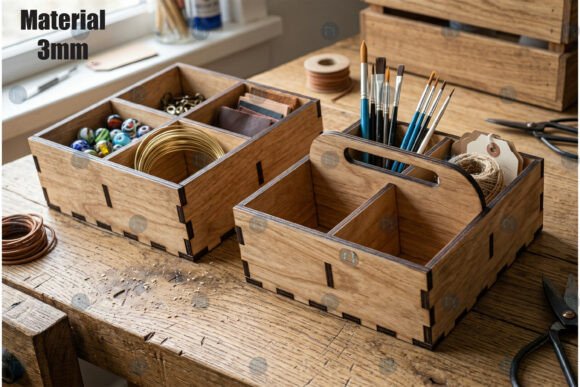
At its core, a laser cut box with dividers is a modular storage solution designed to be assembled from flat sheets of material. Unlike traditional boxes made by folding cardboard or gluing wood, this design relies on interlocking tabs and slots—a technique known as "finger joints" or "box joints." These joints provide structural integrity without the need for excessive glue, resulting in a clean, professional finish.
The inclusion of dividers adds a layer of functionality that elevates the project from a simple container to an organizational system. Dividers allow users to compartmentalize contents, making them ideal for:
- Jewelry organization: Keeping necklaces, earrings, and rings separate and tangle-free.
- Craft supply storage: Sorting beads, buttons, or screws by size and color.
- Product packaging: Creating premium unboxing experiences for soaps, chocolates, or tech accessories.
- Home décor: Building custom display cases for collectibles or plants.
The significance of this design lies in its scalability. Because it is a digital vector file, the same logic used to cut a small ring box can be applied to a large shipping crate, provided the material strength is accounted for. This flexibility is what makes the SVG format so powerful in the maker community.
Why 3 mm Material Thickness Matters
One of the most critical specifications of this particular design is its optimization for 3 mm material thickness. In the world of laser cutting and CNC machining, material thickness is not arbitrary; it dictates the dimensions of every tab, slot, and divider wall.
If you attempt to use this design with 1 mm paper, the tabs may be too thick relative to the slot width, causing the pieces to jam or fail to snap together. Conversely, using 6 mm acrylic would result in gaps that compromise the box's stability. The 3 mm specification ensures that the kerf (the width of the material removed by the laser) and the tolerance (the gap needed for assembly) are perfectly balanced.
Common materials suitable for this thickness include:
- Basswood Plywood: Offers a natural grain and excellent burn resistance.
- Acrylic (PMMA): Provides a sleek, transparent, or colored finish with smooth edges.
- MDF (Medium Density Fiberboard): Ideal for painting and detailed engraving, though it requires careful ventilation during cutting.
- Paper and Cardstock: Perfect for layered paper crafts and prototypes before committing to expensive materials.
Understanding this constraint helps beginners avoid frustration. It emphasizes that successful digital crafting is about respecting the physics of the material as much as the beauty of the design.
Compatibility Across Cutting Technologies
A major advantage of this Laser Cut Box With Dividers SVG is its universal compatibility. The design is not limited to industrial laser cutters; it bridges the gap between professional workshops and home studios. The file structure supports a wide range of hardware:
Laser Cutters and Glowforge
For users of CO2 lasers or diode lasers like the Glowforge, the vector paths define exactly where the beam should cut. The software interprets the lines to control speed and power, ensuring clean cuts through the 3 mm material. The nested layout often included in these files maximizes material usage, reducing waste and cost.
Cricut and Vinyl Cutters
While Cricut machines are primarily blade-based, they are increasingly used for cutting thin woods and cardstocks. The SVG format is native to Cricut Design Space, allowing users to import the box design directly. For thicker materials, a deep-cut blade is required, but the precision of the digital file remains consistent.
CNC Routers
For those working with harder woods or metals, CNC routers can also utilize this design. By converting the file to a G-code compatible format (often via DXF), the router bit follows the exact path of the dividers and walls. This opens up possibilities for creating durable, heavy-duty storage units.
The Power of Multiple File Formats
Flexibility is key in the digital age. A robust design package provides the file in various formats, including AI (Adobe Illustrator), EPS (Encapsulated PostScript), SVG (Scalable Vector Graphics), DXF (Drawing Exchange Format), and PNG (Portable Network Graphics). Each serves a unique purpose in the workflow.
SVG and DXF are the workhorses of the industry. They are lightweight, scalable vector formats that preserve the geometric accuracy of the design regardless of zoom level. These are the preferred choices for loading directly into machine software like LightBurn or LaserGRBL.
AI and EPS files are essential for designers who wish to customize the project before cutting. If you want to add your own logo, change the font on a label, or adjust the spacing of the dividers, these editable formats allow you to do so within professional graphic design software.
Finally, the PNG preview serves as a visual reference. While it cannot be cut, it provides a realistic representation of the final product. Seeing the design in a 3D mockup style helps creators visualize the assembly process and anticipate how light and shadow will interact with the finished box.
Customization: Making the Design Your Own
One of the greatest misconceptions about digital downloads is that they are static. In reality, the Laser Cut Box with Dividers SVG is a starting point. Because the design is easy to customize, you can:
- Adjust the height of the dividers to fit taller items.
- Add intricate patterns or engravings to the exterior walls.
- Combine multiple boxes to create a larger shelving unit.
- Modify the corner joints for a specific aesthetic preference.
This adaptability empowers users to tailor the project to their specific needs, whether for a personal gift or a commercial product line.
Integrating Precision Crafting into Modern Life
The rise of accessible digital fabrication tools has democratized manufacturing. What once required a workshop full of saws and sanders can now be achieved in a home garage or even a living room. The Laser Cut Box with Dividers SVG exemplifies this shift. It represents a move away from mass-produced, generic plastic containers toward personalized, sustainable, and aesthetically pleasing alternatives.
In the context of small business, these boxes offer a competitive edge. Handcrafted packaging signals quality and care to the consumer. In education, they serve as excellent projects for teaching geometry, engineering principles, and computer-aided design (CAD). For daily life, they solve the universal problem of clutter by providing beautiful, custom-fit storage solutions.
Furthermore, the ability to see a realistic 3D mockup before cutting reduces the trial-and-error phase. This efficiency saves time and money, encouraging more people to engage in DIY projects without fear of failure. It builds confidence, turning complex technical concepts into achievable creative endeavors.
Conclusion
The Laser Cut Box with Dividers SVG is more than just a digital file; it is a gateway to precision crafting. By adhering to specific standards like the 3 mm material thickness and offering compatibility across diverse platforms—from Glowforge to CNC—it ensures that creators of all skill levels can produce professional results. The availability of multiple file formats and the ease of customization further enhance its utility, making it a staple for anyone looking to blend technology with tangible creativity.
Whether you are designing a one-of-a-kind gift or launching a line of eco-friendly packaging, understanding the mechanics and potential of this design empowers you to bring your ideas to life with clarity and confidence. As we continue to embrace the tools of the future, designs like these remind us that the most effective innovations are often those that make creation accessible to everyone.