3D Printing Tools Icons: A Practical Guide to Evaluating Flat Design Vector Assets
In the rapidly evolving landscape of additive manufacturing, clear visual communication is just as critical as the physical hardware itself. Whether you are designing a user interface for a slicing software application, creating an instructional manual for a new filament type, or building a marketing website for a fabrication lab, the need for precise iconography is constant. This is where the 3D Printing Tools Icons set becomes relevant. Unlike generic illustration packs that often lack technical accuracy, this specific collection focuses on the essential instruments and materials found in a modern 3D printing workflow. It offers a playful yet professional flat design aesthetic that balances approachability with functional clarity.
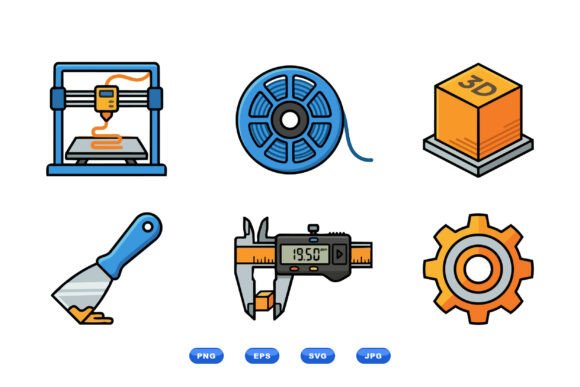
The core value of this asset lies in its specific scope. The set depicts recognizable items such as the printer itself, a filament reel, a digital caliper, a calibration cube, and a putty knife. These are not abstract symbols; they are direct representations of the tools professionals use daily. By choosing a vector-based format, designers ensure that these graphics remain crisp at any resolution, from a tiny mobile app icon to a large-format trade show banner. The inclusion of multiple file formats—SVG, EPS, PNG, and JPG—within a downloadable ZIP package further streamlines the integration process for various digital and print workflows.
Defining the Distinctive Features of the Collection
What sets the 3D Printing Tools Icons apart from standard stock imagery is its adherence to a clean, black-and-white vector style with sharp contours. In the world of UI/UX design, minimalism is often preferred because it reduces cognitive load. Users scanning a dashboard for a "print" button or a "measure" tool need instant recognition without the distraction of gradients, drop shadows, or complex textures. This collection delivers exactly that. The playful flat design adds a touch of personality, preventing the interface from feeling sterile, while the monochromatic base allows for easy color customization to match specific brand guidelines.
The scalability of the files is another defining characteristic. Because the assets are created as vectors (specifically SVG and EPS), they are mathematically defined rather than pixel-based. This means a designer can scale a filament reel icon up by 500% for a poster or down to 16 pixels for a web toolbar without any loss of quality. For agencies managing multi-platform campaigns, this versatility eliminates the need to purchase separate raster and vector licenses, simplifying the asset management workflow significantly.
Comparing Vector Sets Against Raster Alternatives
When evaluating graphic resources for 3D printing projects, the primary decision often comes down to vector versus raster formats. While high-resolution JPEGs or PNGs might suffice for simple blog posts, they present significant limitations for professional applications. Raster images degrade when resized, leading to pixelation that undermines the precision associated with engineering and manufacturing. In contrast, the 3D Printing Tools Icons set provides fully scalable vector files that maintain their integrity across all mediums.
Furthermore, comparing this specific set to more detailed, realistic 3D renders reveals a different strategic choice. Realistic renders are excellent for product photography or hero images but are often too heavy for interface elements. They can slow down page load times and clutter a user interface. The flat design approach of this icon set offers a lightweight alternative that loads quickly and integrates seamlessly into wireframes and prototypes. For developers and designers working within strict performance budgets, the balance between visual appeal and technical efficiency makes this vector set a superior choice for functional icons.
Evaluating Use Cases and Workflow Integration
The utility of the 3D Printing Tools Icons extends beyond simple decoration. Consider a scenario where a manufacturer is updating their safety documentation. Using a consistent visual language helps users identify hazards and procedures quickly. An icon of a caliper clearly signals measurement protocols, while a putty knife icon can indicate post-processing steps like support removal. The distinct, sharp contours of these icons ensure they remain legible even when printed in grayscale on small instruction cards.
For digital product managers, these icons serve as effective navigational aids. Imagine a web application for monitoring farm printers. A row of icons representing the printer, filament status, and calibration tools provides an immediate snapshot of the system's state. The playful nature of the design softens the complexity of the technology, making it more accessible to hobbyists and students who might be intimidated by overly technical diagrams. However, the professional execution ensures that enterprise clients do not perceive the branding as childish.
The inclusion of specific items like the calibration cube and filament reel demonstrates an understanding of the domain. Generic toolkits often include hammers or wrenches that are irrelevant to additive manufacturing. By curating a set that includes the actual tools of the trade, the 3D Printing Tools Icons collection saves designers time searching for disparate assets. It creates a cohesive visual narrative that resonates with the target audience of makers, engineers, and educators.
Weighing Strengths and Potential Tradeoffs
Like any specialized resource, there are tradeoffs to consider before committing to this set. The primary strength is its specificity and scalability. The ability to download the entire suite in SVG, EPS, PNG, and JPG formats covers almost every conceivable use case, from web development to offset printing. The clean black-and-white aesthetic ensures maximum flexibility for color adaptation. You can apply your brand's color palette to the vector paths instantly, ensuring consistency across your digital ecosystem.
However, the minimalist style may not suit every project. If a client requires photorealistic illustrations or highly stylized, hand-drawn artwork, this flat design set might feel too generic or corporate. Additionally, while the set covers the fundamental tools of 3D printing, it is not an exhaustive library of every possible accessory. If a project requires niche equipment like resin tanks, wash stations, or specific industrial extruders, this collection may need to be supplemented with custom illustrations or additional assets.
Another consideration is the "playful" aspect of the design. While generally positive, some strictly industrial contexts might prefer a more austere, technical line-art style over a playful flat design. Decision-makers should review the preview images carefully to ensure the tone aligns with their brand voice. For educational platforms, maker spaces, and consumer-facing apps, the playful tone is likely a benefit. For heavy industrial B2B reporting, a more subdued style might be preferable.
Determining the Right Fit for Your Project
Deciding whether the 3D Printing Tools Icons is the right choice depends largely on the scope and medium of your project. If you are developing a responsive website, a mobile application, or a series of digital infographics, the vector nature and lightweight file sizes make this an ideal solution. The ability to scale without quality loss is non-negotiable for modern web standards, and this set delivers that reliability.
Conversely, if your project relies heavily on atmospheric, moody visuals or requires a specific artistic direction that deviates from flat design, you may need to look elsewhere. The strength of this collection is its neutrality and clarity; it is designed to communicate function first and aesthetics second. Therefore, it is best suited for projects where information hierarchy and usability are paramount.
For teams looking to standardize their visual language around additive manufacturing, this set offers a cost-effective and efficient starting point. It removes the friction of sourcing individual icons and ensures that every representation of a caliper, filament reel, or printer looks consistent throughout the user journey. By prioritizing semantic clarity and technical precision, the 3D Printing Tools Icons set empowers designers to create interfaces and documents that are both beautiful and functional, ultimately supporting better user experiences in the world of 3D printing.