3D Printing Icon Set for Technical Docs
In the rapidly evolving world of additive manufacturing, clear visual communication is just as critical as the physical output of a machine. Whether you are drafting user manuals for industrial printers, creating educational slides for a university course, or designing a landing page for your startup, the right visuals can bridge the gap between complex technical data and human understanding. This is where a specialized 3D Printing Icon Set becomes an indispensable asset. Rather than struggling to find disparate graphics that clash in style or resolution, professionals now have access to cohesive collections designed specifically for this niche.
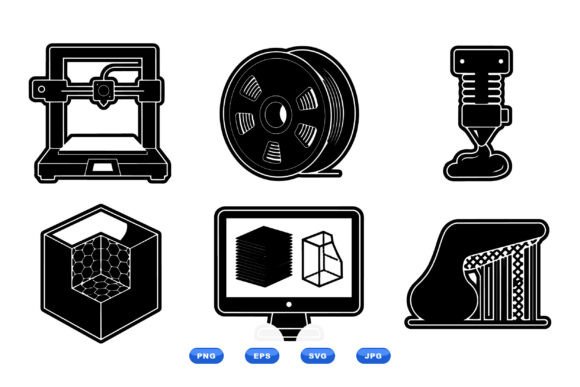
A bold flat design icon set depicting 3D printing components offers more than just aesthetic appeal; it provides a standardized language for your audience. By including essential elements like the printer nozzle, spool, filament, mesh cube, and monitor, these sets cover the entire workflow from digital design to physical realization. For anyone involved in the 3D printing ecosystem, having a reliable library of vector graphics ensures that your documentation, presentations, and digital assets maintain a high standard of professionalism.
The Anatomy of a Professional Vector Collection
What distinguishes a high-quality 3D Printing Icon Set from generic clip art is attention to detail and scalability. The collection described here utilizes a clean black-and-white vector approach, which is a deliberate choice for versatility. In technical documentation, color can sometimes distract from the core message or cause issues with grayscale printing. A monochromatic palette ensures that every element stands out with sharp contours, making the icons legible even at small sizes or when printed on low-quality paper.
The specific components included in this set reflect the actual hardware and software realities of 3D printing:
- Printer Nozzle: Represents the extrusion mechanism, crucial for explaining layer-by-layer construction.
- Spool and Filament: Essential for discussing material types, consumption rates, and loading procedures.
- Mesh Cube: Symbolizes the STL file format and the digital modeling phase before printing begins.
- Monitor: Indicates the slicing software interface and the control aspect of the process.
These aren't just decorative images; they are functional symbols that help users quickly identify steps in a process. Because the files are fully scalable vectors, you can resize them from a tiny favicon to a massive billboard without losing a single pixel of clarity. This scalability is non-negotiable for modern workflows where assets must perform across mobile screens, desktop applications, and large-format trade show displays.
Why Format Flexibility Matters
One of the most significant advantages of this downloadable ZIP package is the inclusion of multiple file formats: SVG, EPS, PNG, and JPG. Each format serves a distinct purpose in a professional's toolkit, and having all of them available saves hours of conversion time.
SVG (Scalable Vector Graphics) is the gold standard for web development. It allows designers to manipulate colors directly within the code, animate the icons, or integrate them seamlessly into responsive websites. For a tech-savvy audience, SVGs ensure fast loading times and crisp rendering on high-resolution Retina displays.
EPS (Encapsulated PostScript) remains vital for print production. If you are sending files to a commercial printer for brochures or packaging, EPS ensures that the sharp contours of the icons remain intact during the RIP (Raster Image Processor) stage. It preserves the vector data needed for high-quality offset or digital printing.
For quick mockups or social media posts where vector editing isn't required, the included PNG and JPG files provide immediate usability. These rasterized versions allow you to drop the icons into presentation slides or email newsletters instantly, without needing specialized software to open vector files.
Real-World Applications Across Industries
The utility of a well-designed 3D Printing Icon Set extends far beyond simple decoration. It solves real problems for various stakeholders in the industry.
Technical Writers and Documentation Specialists often struggle to illustrate complex assembly instructions. Using a consistent set of icons helps break down text-heavy manuals into digestible visual steps. For instance, using the "spool" icon next to a section on material loading creates an immediate visual anchor for the reader, reducing support tickets caused by user error.
Educators and Trainers benefit immensely from these assets when teaching the fundamentals of additive manufacturing. A slide deck featuring a "mesh cube" transitioning to a "nozzle" visually explains the digital-to-physical pipeline better than paragraphs of text. It engages students and reinforces key concepts through recognizable imagery.
Entrepreneurs and Marketers need to establish credibility quickly. A website cluttered with mismatched, low-resolution graphics undermines trust. By implementing a unified 3D Printing Icon Set, businesses signal competence and attention to detail. Whether you are selling filaments, hosting a maker space, or offering custom printing services, consistent branding through these icons enhances user experience and engagement.
Freelancers and Designers can leverage these assets to speed up their workflow. Instead of spending days drawing custom icons for a client project, they can adapt this existing set to match the client's brand guidelines. The clean black-and-white base makes it easy to apply brand colors while maintaining the original structural integrity of the design.
Strategic Implementation for Maximum Impact
While the quality of the icons is high, how you use them determines their effectiveness. When integrating a 3D Printing Icon Set into your projects, consider the context of your audience. For technical manuals, prioritize clarity over flair; keep the icons simple and pair them with concise captions. For marketing materials, you might combine the icons with dynamic layouts to create a sense of innovation and forward-thinking.
It is also worth noting the importance of consistency. Do not mix this flat design set with realistic 3D renders or hand-drawn sketches unless there is a very specific artistic reason to do so. Visual dissonance can confuse the viewer and dilute the message. Stick to the bold, flat aesthetic throughout your document or website to maintain a cohesive narrative.
Furthermore, take advantage of the vector nature of the files. If your brand uses a specific shade of blue or orange, you can easily recolor the black lines of the SVG or EPS files to match your identity perfectly. This customization capability ensures that the 3D Printing Icon Set feels like an intrinsic part of your brand rather than a generic add-on.
Ultimately, the goal of any visual asset is to communicate efficiently. In a field as technical as 3D printing, where precision matters, having a reliable, scalable, and professionally designed icon set is not just a nice-to-have—it is a necessity for clear communication. Whether you are a hobbyist documenting your latest print or a corporation launching a new product line, these tools empower you to present your ideas with confidence and clarity.